Testing New Website

BeauBenken

Shut up, Richard
Staff member
Messages
16,041
Reaction score
5,491
On the list as well. Any graphics guys out there that want to submit a few? Maybe we can have some kind of contest for best submission. Winner gets a free month subscription.
Legit though, if there are graphics guys out there looking to work with us, we would be interested.
 

choo choo

crusty veteran
Messages
1,019
Reaction score
543
I like it fine, except navigation to later pages. Miss being able to select the page itself. Jumping to new posts doesn't help much.
 

clashmore_mike

Administrator
Staff member
Messages
9,724
Reaction score
2,401
I like it fine, except navigation to later pages. Miss being able to select the page itself. Jumping to new posts doesn't help much.
You can select the page you want to jump to by clicking the numbered box under the thread title in the forum listing. There are also places at the top and bottom of every thread to select a page number. Is there something else you're looking for?
 

ab2cmiller

Troublemaker in training
Messages
11,453
Reaction score
8,532
You can select the page you want to jump to by clicking the numbered box under the thread title in the forum listing. There are also places at the top and bottom of every thread to select a page number. Is there something else you're looking for?
I didn’t realize you could click on the page number box and simply type in the page you wanted. I’m assuming that he didn’t either
 

choo choo

crusty veteran
Messages
1,019
Reaction score
543
You can select the page you want to jump to by clicking the numbered box under the thread title in the forum listing. There are also places at the top and bottom of every thread to select a page number. Is there something else you're looking for?
Ok. Thanks. Didn't see the number box.
 

irishog77

NOT SINBAD's NEPHEW
Messages
7,441
Reaction score
2,206
Do y'all remember on the old, old site how there was a button to go to the next thread in that particular forum? Like if you were in the '17 recruit profiles, went into a particular player's thread, you could go to the previous or next one in that thread. Was super handy if you hadn't been on in a few days and you could flow through all your unread stuff pretty easy. Was super cool. Better than going back to home page every time to get to the next thread.
Any chance we can get that back?
 

ulukinatme

Carr for QB 2025!
Messages
31,516
Reaction score
17,379
All of these media types/sites should auto embed.
Reddit, Twitch, and Spotify too?!
Do y'all remember on the old, old site how there was a button to go to the next thread in that particular forum? Like if you were in the '17 recruit profiles, went into a particular player's thread, you could go to the previous or next one in that thread. Was super handy if you hadn't been on in a few days and you could flow through all your unread stuff pretty easy. Was super cool. Better than going back to home page every time to get to the next thread.
Any chance we can get that back?
Why not just go to the year you're looking at recruits and then open each you wanna look at in a new tab?
 

NDdomer2

Local Sports vBookie
Messages
17,050
Reaction score
3,875
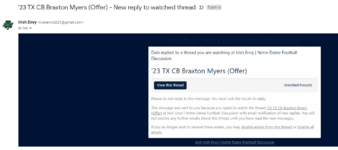
i keep getting random email notifications. I have made sure any threads I have subscribed to I click the "without emails" i have unselected the boxes in my settings for not receiving email notifications as well. Is there some sort of auto subscribe with emails if you post in the thread?
 

ab2cmiller

Troublemaker in training
Messages
11,453
Reaction score
8,532
i keep getting random email notifications. I have made sure any threads I have subscribed to I click the "without emails" i have unselected the boxes in my settings for not receiving email notifications as well. Is there some sort of auto subscribe with emails if you post in the thread?
Settings ----- Preferences -----Content Options
 

ulukinatme

Carr for QB 2025!
Messages
31,516
Reaction score
17,379
i keep getting random email notifications. I have made sure any threads I have subscribed to I click the "without emails" i have unselected the boxes in my settings for not receiving email notifications as well. Is there some sort of auto subscribe with emails if you post in the thread?
I resubscribbed to like...300 threads after the new site went live. I was kinda hoping there was a way to flip those options where the default is "Watch without e-mail alerts." instead of the default being /w e-mail alerts.
 

BeauBenken

Shut up, Richard
Staff member
Messages
16,041
Reaction score
5,491
I think i disabled emails for watched content. We'll see if that helps. Is there not a button to unsubscribe though at the bottom of the email?
 

clashmore_mike

Administrator
Staff member
Messages
9,724
Reaction score
2,401
Sorry guys, I turned on the emails last night and thought I had set the defaults to only PMs. Let us know if Beau's fix worked or not and we'll take another look if need be. The permission/default settings have been my biggest headache so far.
 

NDdomer2

Local Sports vBookie
Messages
17,050
Reaction score
3,875
I think i disabled emails for watched content. We'll see if that helps. Is there not a button to unsubscribe though at the bottom of the email?
i never looked at the email to see. i kept coming back to the individual threads, unwatching, and rewatching with the no email notification. Then couple hours later, bam another one.

Thanks Clash/Beau and all for responses.
 

NDdomer2

Local Sports vBookie
Messages
17,050
Reaction score
3,875
1643921833413.png
it doesnt seem like its every reply or every thread, no consistency that I can put to it.
 

clashmore_mike

Administrator
Staff member
Messages
9,724
Reaction score
2,401
View attachment 3050307
it doesnt seem like its every reply or every thread, no consistency that I can put to it.
Ok thanks for that screenshot. I will look at your settings the next time I get to my computer. If you click either of the links in the bottom of that email do you get taken to your email settings on IE?
 

clashmore_mike

Administrator
Staff member
Messages
9,724
Reaction score
2,401
Is there a Dark Mode on the site ?
Not currently, there was only the default theme on the site which was set to be close to the last look. I'll either need to create one or find a good one to import.
 

domer13

Well-known member
Messages
346
Reaction score
377
Low priority:

Regarding the "What's new" page. Currently (I'm in desktop Chrome), when I click on a bolded thread (bolded indicating new posts), read the new posts, then hit (back button, alt-left arrow, etc.) to navigate back to the "What's new" page, the thread I just read is still bolded. I have to reload the "What's new" page again in order to get the "read" thread to unbold.

On the old site, when I hit the back button, the thread(s) I had just read through was unbolded (indicating no new posts). It helped to be able to quickly see the threads I had read.

I hope this is clear. Many thanks for your work clashmore. Again, this is a low priority (I'm just lazy).
 

clashmore_mike

Administrator
Staff member
Messages
9,724
Reaction score
2,401
Low priority:

Regarding the "What's new" page. Currently (I'm in desktop Chrome), when I click on a bolded thread (bolded indicating new posts), read the new posts, then hit (back button, alt-left arrow, etc.) to navigate back to the "What's new" page, the thread I just read is still bolded. I have to reload the "What's new" page again in order to get the "read" thread to unbold.

On the old site, when I hit the back button, the thread(s) I had just read through was unbolded (indicating no new posts). It helped to be able to quickly see the threads I had read.

I hope this is clear. Many thanks for your work clashmore. Again, this is a low priority (I'm just lazy).
I've noticed this too. I'm not sure there is anything I can do on my end but I will see if there are any other reports of this from other xenforo forums.
 

clashmore_mike

Administrator
Staff member
Messages
9,724
Reaction score
2,401
Low priority:

Regarding the "What's new" page. Currently (I'm in desktop Chrome), when I click on a bolded thread (bolded indicating new posts), read the new posts, then hit (back button, alt-left arrow, etc.) to navigate back to the "What's new" page, the thread I just read is still bolded. I have to reload the "What's new" page again in order to get the "read" thread to unbold.

On the old site, when I hit the back button, the thread(s) I had just read through was unbolded (indicating no new posts). It helped to be able to quickly see the threads I had read.

I hope this is clear. Many thanks for your work clashmore. Again, this is a low priority (I'm just lazy).
After a quick search there are some users experiencing the same thing. I looked at the widget settings for what's new and there are not options to change the look of read/unread links. I did switch it so that only unread threads will be displayed, but simply using the back button doesn't work. That page still needs reloaded to take effect.

Instead of hitting back, you can hit the What's New again from the top nav bar and that will refresh the list for you.
 
Last edited:

irishog77

NOT SINBAD's NEPHEW
Messages
7,441
Reaction score
2,206
My "What's New" just turned into only what is literally new. It's now a boatload of threads from the last several days that I haven't read, but all the ongoing/trending threads are missing.

Not sure what happened. I can't find the threads that we've been discussing today.
 
Top