Home wifi help

PANDFAN

Look Down
Messages
16,770
Reaction score
2,278
I have DSL through Verizon and have a modem/router combo. With having 4 kids and all their gadgets and everything we have connected we are having issues with WiFi dropping, lagging and having to reset the router pretty regularly....do those wifi extenders work? Do I need a better router/modem? What kind of options do I have without switching internet provider as I'm paying 40.00 month
 

GowerND11

Well-known member
Messages
6,539
Reaction score
3,291
I have DSL through Verizon and have a modem/router combo. With having 4 kids and all their gadgets and everything we have connected we are having issues with WiFi dropping, lagging and having to reset the router pretty regularly....do those wifi extenders work? Do I need a better router/modem? What kind of options do I have without switching internet provider as I'm paying 40.00 month

Router/Modem combos usually work worse than getting seperate ones. I would suggest getting separate ones, and getting an AC WIFI router. Those handle the most traffic at the fastest speed.
 

Legacy93

Member
Messages
132
Reaction score
17
Router/Modem combos usually work worse than getting seperate ones. I would suggest getting separate ones, and getting an AC WIFI router. Those handle the most traffic at the fastest speed.

Completely agree with the above. I switched to a separate router and modem and only have issues with speed when there are service provider issues. Also if you are going to have a number different devices that are all using WiFi, I would suggest you look into a dual band router. You will have two different signals and can have certain devices connect to one band and others to the second. I've seen enormous improvement in speed as a result of doing that (hooking AppleTv/computers to one band and then phones and other smaller electronics exclusively on the other band).
 

BGIF

Varsity Club
Messages
43,946
Reaction score
2,922
I looked into this and was told it compromised throughput. With 4 kids sounds like you already have throughput issues.

I bought a more powerful dual band router.


Range extenders can expand the reach of your existing wireless network. This enables you to access the Internet when you're not close enough to your router to receive a good signal. While range extenders can be effective in increasing wireless range, they reduce throughput and create performance issues.
 

PANDFAN

Look Down
Messages
16,770
Reaction score
2,278
Router/Modem combos usually work worse than getting seperate ones. I would suggest getting separate ones, and getting an AC WIFI router. Those handle the most traffic at the fastest speed.

Is there big difference in performance vs pricing... Saw some Linksys one for 59.00 but then others for 150.00 etc... What type of things should I look for when comparing
 

PANDFAN

Look Down
Messages
16,770
Reaction score
2,278
What's the difference between dual band router and ac router?
 

BleedBlueGold

Well-known member
Messages
6,270
Reaction score
2,493
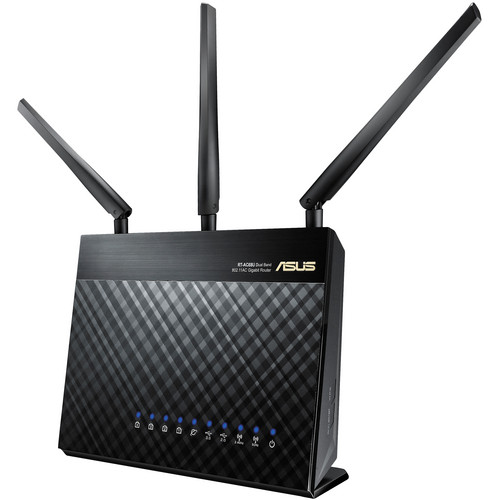
We have this router:

asus_rt_ac68u_ac1900_dual_band_wireless_gigabit_1383169713000_1010152.jpg


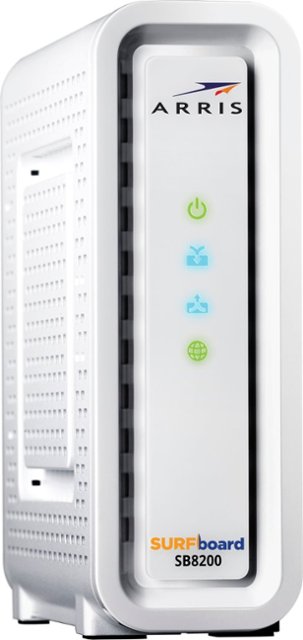
And this modem:

5839003_rd.jpg;maxHeight=640;maxWidth=550


Both work really well. Only occasionally do we have issues with reach or lag.
 

BGIF

Varsity Club
Messages
43,946
Reaction score
2,922
What's the difference between dual band router and ac router?


https://www.flashrouters.com/learn/router-basics/what-is-wireless-ac

THE FUTURE OF WIFI IS NOW!
What is Wireless-AC?
People generally refer to all Wireless Internet as WiFi, but, as with a lot of technical jargon, the term "WiFi" is often misused. Are you one of those people constantly asking: Why is my Internet and/or WiFi so slow?!? You may be surprised to hear this, but it is often not the Internet provider’s fault. It all comes down to the power of the router you are using.

The fact of the matter is that there is no current wireless networking standard that can compare, performance-wise, to Wireless-AC (802.11ac). Wireless-AC can transmit wireless at rates more than 6x the best Wireless-N devices, and 100x the best Wireless-G devices. In an age of streaming media and online gaming, Wireless-AC is not just a luxury: it is the networking standard you need and deserve.

Why Should You Upgrade to Wireless-AC from Wireless-G or Wireless-N?
Hanging onto an older Wireless-G router means you are sacrificing overall speed and security while hindering the wireless capabilities for newer devices.

Using a Wireless-G router with an iPhone iPad may feel like trying to catching a fish with a rock: it may eventually work, but it is certainly not the most efficient way to get the job done. This is not an iPhone-6-to-iPhone-6S-type upgrade, where your device is a little bit sleeker device and you have a few new features to play with. When a wireless standard is jumped, you are talking about MAJOR wireless connectivity improvements.

Explaining Wireless-AC Advantages
Bandwidth
Wireless-AC has wider bandwidth capabilities of 80 MHz (and an optional 160 MHz). By comparison, Wireless-N’s bandwidth was only 20 or 40 MHz. Imagine the MHz as lanes on a highway: 20 MHz represents 2 lanes and 80 MHz represents 8 lanes. The more lanes available, the larger the amount of data that can pass through simultaneously, thus allowing for maximum performance connection speed.

Multi Input Multi Output (MU-MIMO)
MIMO isn’t new, but MU-MIMO allows communication with 4 different devices at the same time where you only used to be able to connect one. No longer is there a queue of connectivity on a router waiting for availability. With Wireless-AC, more devices can connect instantly to a single router, with less interference or disruptions.

Staying Above the Wireless Clutter
Wireless-AC focuses its power by running on the 5 GHz frequency band. The 2.4 GHz band used by Wireless-N & Wireless-G is cluttered with signal interference from cordless phones, Bluetooth headsets/keyboards, baby monitors, neighboring wireless networks, remote door openers, and even microwaves, to name a few disruptive devices. Just about anything wireless thing in your home builds the level of interference, but 5 GHz rises above that din and avoids being affected.
 

IrishLax

Something Witty
Staff member
Messages
37,545
Reaction score
28,995
I recently went through some home WiFi coverage issues and then purchased the Google Home WiFi system... all problems solved. Plugged it right into the router, followed the instructions setting up the other points for the mesh network, the end.

If you're having bandwith issues, that's a different story though.
 

PANDFAN

Look Down
Messages
16,770
Reaction score
2,278
IE, you guys are the best! Thanks for all the help, suggestions and info..
 

GowerND11

Well-known member
Messages
6,539
Reaction score
3,291
What's the difference between dual band router and ac router?

They actually aren't different. Dual band incorporates ac technology as well as an earlier standard.

This explains it fairly well along with the benefits of dual-band:
https://www.linksys.com/us/r/resource-center/basics/multiple-wifi-bands-difference/

^This


Is there big difference in performance vs pricing... Saw some Linksys one for 59.00 but then others for 150.00 etc... What type of things should I look for when comparing


https://www.newegg.com/Product/Prod...VFFmGCh1B6Qp-EAQYBCABEgJy3vD_BwE&gclsrc=aw.ds

I have this Netgear (or one similar) and at $120 it's very reasonable. Plus, if you're currently renting the use of your modem/router I think paying for both upfront, you come out ahead anyway. And if you change providers, you keep it.
 

Veritate Duce Progredi

A man gotta have a code
Messages
9,358
Reaction score
5,352
Best suggestion that's only tangentially related: run cat5 through your house and purchase a network hub. Nothing beats the tried and true wired connection.

When we finally build a house, I'll be running the cat5 network through the walls myself.
 

Meatloaf

Well-known member
Messages
2,058
Reaction score
951
Best suggestion that's only tangentially related: run cat5 through your house and purchase a network hub. Nothing beats the tried and true wired connection.

When we finally build a house, I'll be running the cat5 network through the walls myself.

This is what I did. Bought a cat5 cable for ~10 bucks, and ran it from my router to my room where I get poor wifi reception and saved myself a couple hundred bucks. Fastest and most secure connection you can have.
 

dshans

They call me The Dribbler
Messages
9,624
Reaction score
1,181
Best suggestion that's only tangentially related: run cat5 through your house and purchase a network hub. Nothing beats the tried and true wired connection.

When we finally build a house, I'll be running the cat5 network through the walls myself.

While I decidedly agree that har wired connections are preferable, try to think ahead.

Ages ago I expended much time, energy, and cash to wire a shit-load of things in my house. When I put up a detached garage I wired it with not only power, but a telephone line and a feed to my stereo in the house to an amp in the garage to power speakers I mounted, both inside and outside.

The phone line became quickly unnecessary when I was soon able to buy a wireless phone with a base that allowed me to go to my garage, and even to neighbors two doors down (to sip G&Ts, beer or bourbon) and not miss a call.

The hardwired link to the stereo was soon preempted by an iPod.

I also wired three phone lines to damn near every room in the house. One line for the house, one for my business, and one for the computer (Dial-Up, ) and fax machine.
Later, with a bit of jiggering on my part, converted to a DSL line.

My cautionary tale? Don't count on cat 5 wiring to remain the standard, or even necessary.

Bon Chance!
 

Veritate Duce Progredi

A man gotta have a code
Messages
9,358
Reaction score
5,352
While I decidedly agree that har wired connections are preferable, try to think ahead.

Ages ago I expended much time, energy, and cash to wire a shit-load of things in my house. When I put up a detached garage I wired it with not only power, but a telephone line and a feed to my stereo in the house to an amp in the garage to power speakers I mounted, both inside and outside.

The phone line became quickly unnecessary when I was soon able to buy a wireless phone with a base that allowed me to go to my garage, and even to neighbors two doors down (to sip G&Ts, beer or bourbon) and not miss a call.

The hardwired link to the stereo was soon preempted by an iPod.

I also wired three phone lines to damn near every room in the house. One line for the house, one for my business, and one for the computer (Dial-Up, ) and fax machine.
Later, with a bit of jiggering on my part, converted to a DSL line.

My cautionary tale? Don't count on cat 5 wiring to remain the standard, or even necessary.

Bon Chance!

This is a fair point. There is no way to project what standards will be used for the next 50+ years but it's probably safe to run a hardline for data transfer in a home. If you're worried that data size will grow too fast and the wire will be deprecated, go with Cat6 or Fiber (FiOS), then your poised to take advantage of the fastest ISPs for the next 50 years, even if there is some remarkable breakthrough in technology and a new protocol emerges.

There is zero chance those two standards are incapable of supporting your data needs in the future, unless you need to download the entire corpus of the Library of Congress 3x/day.
 
Top