Everett and Kate Sigs 2.0, now with female version!

Andy in Sactown

Can't wait 'til gameday.
Messages
2,689
Reaction score
327
Last year I made an Everett and Kate Upton signature that was relatively well received and wound up turning into a nice act of solidarity on the board in support of our young quarterback.

Well, since I was bored waiting for Gamestop to open up, I've made new signatures for this year. And since not all the ladies are into Kate Upton, I tried to make a nice version for the fairer sex as well. Enjoy!

Original:
kateandeverett.jpg


Kate Upton for the gentlemen:
sig2_zpsf764a2e5.jpg


And a male athlete version for the ladies:

sig2_baylor_zpseb56d897.jpg


Just kidding ladies.. here you go:
sig2_female_zps4decc56e.jpg
 
Last edited:

Kingbish01

Well-known member
Messages
3,414
Reaction score
2,375
LOL...At first I thought that was Ronald Darby in a Baylor Uni
 

Andy in Sactown

Can't wait 'til gameday.
Messages
2,689
Reaction score
327
I also do requests, but I reserve the right to laugh and decline.

Damn that looks good. Colors are much more vibrant. Nice change of pace.
 
Last edited:

rikkitikki08

Well-known member
Messages
4,261
Reaction score
3,090
HAHAHAHAHAHA

Ok but for real i need the code again.......im computer stupid
 

Andy in Sactown

Can't wait 'til gameday.
Messages
2,689
Reaction score
327
HAHAHAHAHAHA

Ok but for real i need the code again.......im computer stupid

From chrome I just right-click the sig I want and select copy image url.

Then you can go into your User CP and click on Edit Signature.

The dialog box is just like any post, so just click on the add image icon and paste the url you copied into the box and click ok, and then submit (I think).

That's roughly (exactly?) what I did.
 

rikkitikki08

Well-known member
Messages
4,261
Reaction score
3,090
From chrome I just right-click the sig I want and select copy image url.

Then you can go into your User CP and click on Edit Signature.

The dialog box is just like any post, so just click on the add image icon and paste the url you copied into the box and click ok, and then submit (I think).

That's roughly (exactly?) what I did.

Thanks brah
 

Andy in Sactown

Can't wait 'til gameday.
Messages
2,689
Reaction score
327
That linked to your photobucket album. It's way easier to do it Sac's way.

It's actually my photobucket album. I tried to send him the URL via PM because he apparently isn't using chrome, so he has no "copy image url" option. IE truncates any url, be it a post or a PM (see the ...'s in the link text), so I sent another PM with the url enclosed in quotes so it wouldn't be malformed as well as editing my instruction post in the thread.

My guess is Layhey has had a couple and needed to grab Randy and/or some more liquor.
 

peoriairish

New member
Messages
4,145
Reaction score
350
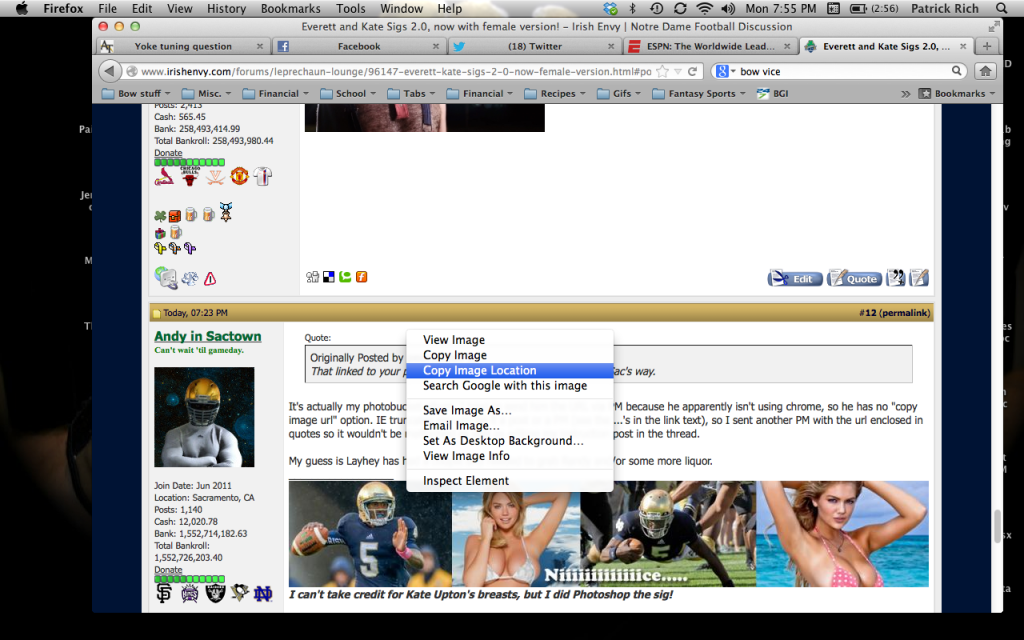
You can do the exact same thing in Firefox... just right click on the picture, then click on what I have highlighted here. Then do what your directions said above.

ScreenShot2013-04-01at75519PM_zps3dd35930.png
 

Andy in Sactown

Can't wait 'til gameday.
Messages
2,689
Reaction score
327
The dude had some helpfull words, so rather than rehash it, I'll just place them here:

woolybug25 said:
Hey dude. Hope all is well. Just thought you might want to send the message that they can highlight their preferred text below, hit the "reply" button and hit the
insertimage.gif
button and paste it in the box that pops up. Then simply copy everything in the box. Then go back to their edit page and paste it there. That should allow the chromers to do it.

For the doods
http://i300.photobucket.com/albums/nn33/odywon/sig2_zpsf764a2e5.jpg

For the ladies
http://i300.photobucket.com/albums/nn33/odywon/sig2_female_zps4decc56e.jpg

Stay cool, brosif.
 
Top